New Features
- Context-sensitive help panel!
An intelligent help panel automatically shows relevant tips and guides depending on what you are doing: creating tours, adding destinations, or managing vehicles.
Activate the help via the menu and let it guide you step by step through the app.
Improvements
- Color-coded vehicle names in the calendar!
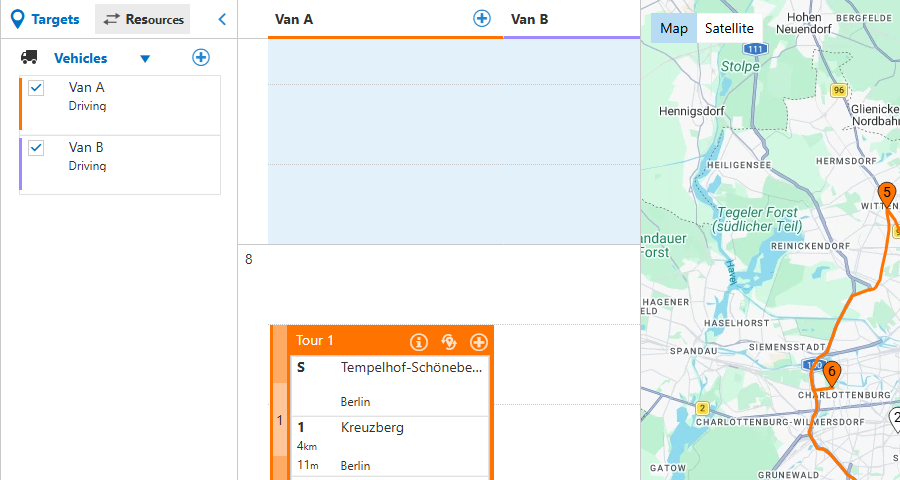
Vehicles are now displayed in their assigned color - so you can see at a glance which vehicle is assigned to which tour.
- Destinations and resources in two tabs!
The sidebar is split into two tabs: "Destinations" for unplanned destinations and "Resources" to switch between vehicles and employees – clearer than one long combined list.
- Clickable elements in action color!
All clickable buttons and links are consistently highlighted in blue – making it immediately clear what is interactive.
Bug Fixes
- Display for consecutive identical destinations corrected
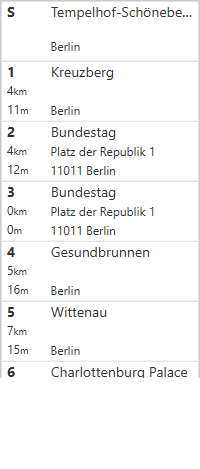
A problem was fixed where the display of start marker (S), destination number, distance (0 km) and duration (0 m) was incorrect for consecutive identical destinations. The logic now works flawlessly.
- Tour optimization for identical destinations corrected
After executing "Optimize tour", distance and duration were displayed incorrectly for consecutive identical destinations. This problem has been fixed, the display is now correct.
- Email sending issues fixed
Verification emails were not sent when creating an account, and password reset emails were not sent when resetting a password. These issues have been fixed. Sending tours by email is working again as well.

Plan your first route and tour
Free and optimized.
Start now